A moving picture without batteries
Slide a transparent sheet printed with black stripes slowly across a still picture, and the person in the picture starts to walk. No batteries, no motor.
There is a trick, of course. This "picture that moves under stripes" is made of nothing but several drawings cut into narrow strips and woven together, plus a striped sheet with gaps. In this simulation we will give away the whole trick. Then we will ask a deeper question: why does seeing one still picture after another make us perceive motion at all? That question, it turns out, goes back two hundred years, to a man watching carriage wheels through the gaps in a fence.
Cut into strips, hide with stripes
First, prepare n pictures, called frames, covering one cycle of the motion. For a walking person: leg forward, foot down, leg back, and so on, in n steps.
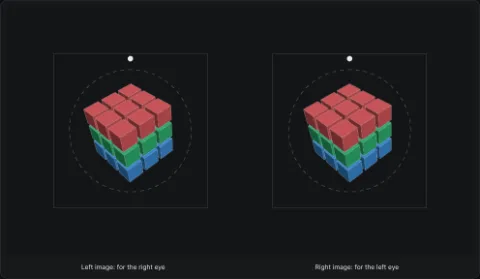
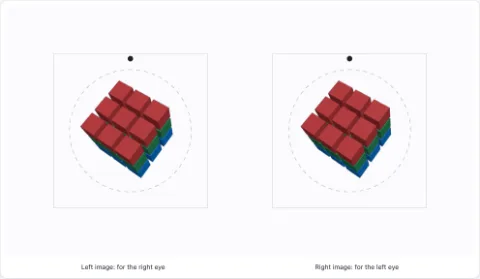
Next, cut every frame into vertical strips of width w and rearrange them: strip 1 of frame 1, strip 1 of frame 2, …, strip 1 of frame n, then strip 2 of frame 1, and so on. The result is a single interlaced image. Without the sheet it looks odd, with all the frames chopped up and mixed together.
Finally, print black bars on a transparent sheet. The gaps, or slits, are w wide and the bars are (n − 1)w wide, so the stripe period is n·w, exactly matching the "groups of n strips" in the interlaced image. Lay the sheet on top, and through every slit you see strips of one and the same frame, while the other frames are hidden behind the bars. Shift the sheet sideways by w, and the slits now sit over the strips of the next frame. Keep sliding, and you see frame 1, frame 2, frame 3, … in turn. The picture moves.
Let's turn the recipe straight into formulas. Column , counted in screen pixels from the left edge, lies in strip number , where the brackets mean rounding down. The strips cycle through frames 0, 1, …, , so strip belongs to the frame given by the remainder of divided by :
The sheet has slits of width repeating with period . If its left edge, meaning the left edge of the first slit, is at position , column falls in a slit when the remainder of divided by is less than :
With the slits sit at to , to , and so on, all over strips with remainder 0, that is, frame 0. With every slit has moved over by strips, as the figure shows, and every open column belongs to frame . Each shift of advances one frame, so if you slide the sheet at speed in pixels per second, frames change at per second. To advance 6 frames per second with , the sheet must move at .
In these formulas, the humble tools of rounding down and remainders take center stage. "Which strip belongs to which frame?" is a question about counting in a repeating pattern, an idea that turns up constantly in programming.
Now a thought experiment. More frames give smoother motion. Is that all good news? Unfortunately not. Only out of every is open, so you see just of the paper: one sixth for , one tenth for . The more frames, the darker and more broken-up the picture. Make the slits too wide instead, and two frames show at once, giving a double, blurred image. Smoothness and visibility are a trade-off.
Striped sheets that set pictures moving had appeared by the late 1890s. A picture book published in London in 1898 came with a striped transparent sheet; "magic moving pictures" postcards used the same idea, and a French toy called the Ombro-Cinéma was patented in 1921. Picture books built on the trick became popular again in the 2000s.
The striped-sheet idea is also used for 3D displays. In the "parallax barrier" method, a layer with fine slits in front of the screen lets each eye see different pixels; it was used, for example, in a handheld game console whose screen looked 3D without glasses. "Lenticular printing", which uses rows of tiny cylindrical lenses so that different pictures are seen from different angles, is a close relative. You may have seen cards or posters whose picture changes or moves as you tilt them.
Is it persistence of vision?
Here is a question for you. All we ever see is a series of slightly different still pictures. So why do we feel that a leg is moving smoothly? Films, television and animation all do the same thing.
The explanation you often hear is "persistence of vision": an afterimage lingers in the eye and joins one picture to the next. But think about it. An afterimage is a still image. Overlap the afterimage of one picture with the next picture and you should see two pictures superimposed, not smooth motion. Indeed, critics have pointed out since the 1970s that persistence of vision is the wrong explanation. The modern view is that when things appear one after another at nearby places, the brain interprets them as one thing moving. This is called apparent motion. The motion is not left over in your eye; your brain makes it.
The "afterimage" explanation itself has a long history. The story starts in London in 1824. Peter Mark Roget, a physician later famous for his thesaurus, reported to the Royal Society that when you watch a moving carriage wheel through the gaps of a fence or a Venetian blind, the straight spokes look curved. When gaps chop a moving object into separate glimpses, what you see changes: the same setup as our striped sheet. Roget explained it by impressions lingering on the retina for a moment, and that idea of "persistence of vision" went on to serve, for a very long time, as the standard explanation of moving pictures.
In 1832 the Belgian physicist Joseph Plateau and, in Vienna, Simon Stampfer independently built devices in which you look through the slits of a spinning disk at a series of slightly different pictures; Plateau's was the phenakistiscope. In 1834 William Horner in England described a drum with pictures inside, viewed through slits in its wall, and in the 1860s it spread in America under the name "zoetrope". Each of them uses slits to show "just one picture for an instant", much like the striped sheet.
In 1878 the photographer Eadweard Muybridge photographed a running horse with a row of cameras at Leland Stanford's farm, to settle whether a galloping horse ever has all four hooves off the ground. It does, but not with its legs stretched out front and back as in old paintings: the airborne moment comes when the legs are gathered under the body. From 1880 he showed the horse in motion to audiences with a projector of his own design, the zoopraxiscope, which threw onto a screen pictures painted from his photographs and set around a spinning glass disk.
But why does it look like motion? In 1912 the psychologist Max Wertheimer published a detailed study of two lights switched on one after the other. With the right interval you see one light moving, and under some conditions you see only a pure sense of "something moved". His observers were Wolfgang Köhler and Kurt Koffka, who would lead Gestalt psychology with him. The story goes that the idea came to him on a train journey and that he got off at a station to buy a toy stroboscope. The study is counted among the beginnings of Gestalt psychology, with its idea that the whole is more than the sum of its parts. Then, in papers in 1978 and 1993, the film scholar Joseph Anderson and his coauthors argued that explaining film motion by persistence of vision is a myth. Roget's explanation was overturned after more than 150 years.
Cinema shows 24 frames per second; television and games show 30 to 60 or more. Hand-drawn animation often holds each drawing for two frames, building motion from 12 drawings per second, and Japanese TV anime commonly holds drawings for three frames, just 8 drawings per second. We still see motion. How many pictures are needed depends on the speed of the motion and on what the pictures show.
Running backward
Another thought experiment. Instead of sliding the sheet smoothly, jump it to the right by at a time. The visible frame changes as . The sheet moves right, yet the picture steps backward, one frame at a time. Someone who glances at a clock only every 55 minutes would see the minute hand creep back 5 minutes each time; it is the same kind of mistake. You may have seen a stagecoach wheel in a film turning slowly backward. Same thing: if the wheel turns more than half the spacing between spokes from one frame to the next, the brain picks the nearer, backward rotation. This mistake, caused by looking only at separate instants, is called aliasing.
From the side of information technology, the link between animation and frame rate becomes clear. The backward-turning wheel is aliasing, a problem that turns up wherever sound or images are recorded as separate samples.
A tiny mismatch makes moiré
Now, what if the stripe period is slightly wrong, ? Numbering the slits , slit then starts at , and the strip under it belongs to frame
because is a multiple of and does not change the remainder. With no error, and every slit shows the same frame. With an error, grows by per slit, and each time it grows by 1 the visible frame changes. That takes slits, a distance of . With and , the visible frame changes about every 250 px, and broad bands called moiré appear across the picture. This is the same thing that happens when two notes of slightly different pitch produce beats: a slow pattern at the difference frequency .
Moiré, in other words, is a cousin of beats. Superpose two waves of nearby frequency and you get a slow rise and fall at the difference frequency: with sound you hear it as beats, with stripes you see it as moiré, and it is the same mathematics.
Moiré is everywhere too. Photograph a computer screen with your phone and wavy bands often appear in the picture. The screen's grid of pixels and the camera sensor's grid overlap with slightly different periods, exactly like the stripe-period error in this simulation.
This simulation also builds its strips from a whole number of screen pixels, because otherwise strip edges would straddle pixels, blur, and themselves cause moiré.
Slide the sheet yourself
- When the page opens, the sheet is stopped and the picture and stripes are shown faint, so that you can read the light-stimulus warning before anything moves. After reading it, press ▶ Play or "→ Slide the sheet", and the sheet slides automatically and the pinwheel spins. The same button turns into "✋ Stop". Press "✋ Stop", then drag the sheet, or the small tab above the picture, left and right. When you let go, the sheet snaps to a strip boundary.
- How far does the sheet move when you press "Forward one frame →"? Compare with the slit width w shown below the picture. The highlighted thumbnail under "Original frames" shows which frame you are seeing.
- Under "Display", choose "Remove the sheet (interlaced image)" to look at the interlaced image. "Reveal (color strips by frame)" colors each strip by its frame.
- Compare and with "Number of frames ". How do smoothness and brightness change? Predict before you try.
- With the sheet stopped, set "Stripe period error " to 2%. With "Striped sheet on top", the picture becomes a jumble of different frames in different places. Set "Display" to "Reveal (color strips by frame)", and the color seen through the slits changes as you move across the picture, forming bands of one color each. Predict the width of a band with , and check it against "Moiré" in the panel.
- Change "Automatic speed" from 1 to 12 frames per second. At what rate do the pictures start to look like motion?
In art and crafts you can print a few of your own drawings and build the real thing with a transparent sheet and paper. Once you understand the principle, you can decide for yourself how wide the slits and how bold the lines should be.
Why still pictures move
The interlaced image consists of frames cut into strips of width and placed in turn. With a striped sheet of period and slit width , only one frame is visible. Shifting the sheet by shows the next frame; at sheet speed frames change at per second, and apparent motion makes the picture move. More frames give smoother motion but leave only of the paper visible. A mismatched stripe period produces moiré, and looking only at separate instants can even make motion run backward.
From Roget watching wheels through a fence, through the inventors of slit-and-disk toys, Muybridge's galloping horse and Wertheimer's flashing lights, the question "why do still pictures move?" gave us film, animation and glasses-free 3D screens, and it is behind every video you watch. The answer turned out to lie not in afterimages in the eye but in the brain's interpretation.
So how quickly must pictures change before the brain sees "motion" rather than "separate pictures"? And does the answer depend on what the pictures show?
Sources and further reading
Main sources for the facts mentioned above.
- P. M. Roget, Explanation of an optical deception in the appearance of the spokes of a wheel seen through vertical apertures, Philosophical Transactions of the Royal Society, 1825
- Full text of Roget's paper above (Internet Archive)
- History of Information, The Phenakistoscope, the First Device to Demonstrate the Illusion of a Moving Image (Plateau and Stampfer)
- The Public Domain Review, Phenakistoscopes (1833)
- IEEE Spectrum, June 1878: Muybridge Photographs a Galloping Horse
- T. Sethapakdi et al., FabObscura: Computational Design and Fabrication for Interactive Barrier-Grid Animations, MIT CSAIL (history and design of barrier-grid animation)
- CGWORLD.jp glossary, Limited animation (shooting on threes; in Japanese)
Further reading (encyclopedia):